Sound Library
AuditoryCompanion needs a shelf full of ambiences; game prototypes need a shelf full of effects. Buying a sample pack gets you somebody else’s sample rate, somebody else’s loudness, and a lot of files you’ll never touch. So I built the shelf.
Ten categories at a glance#
Sound has no thumbnail, so I drew the waveforms. This image is faster than listening ten times:
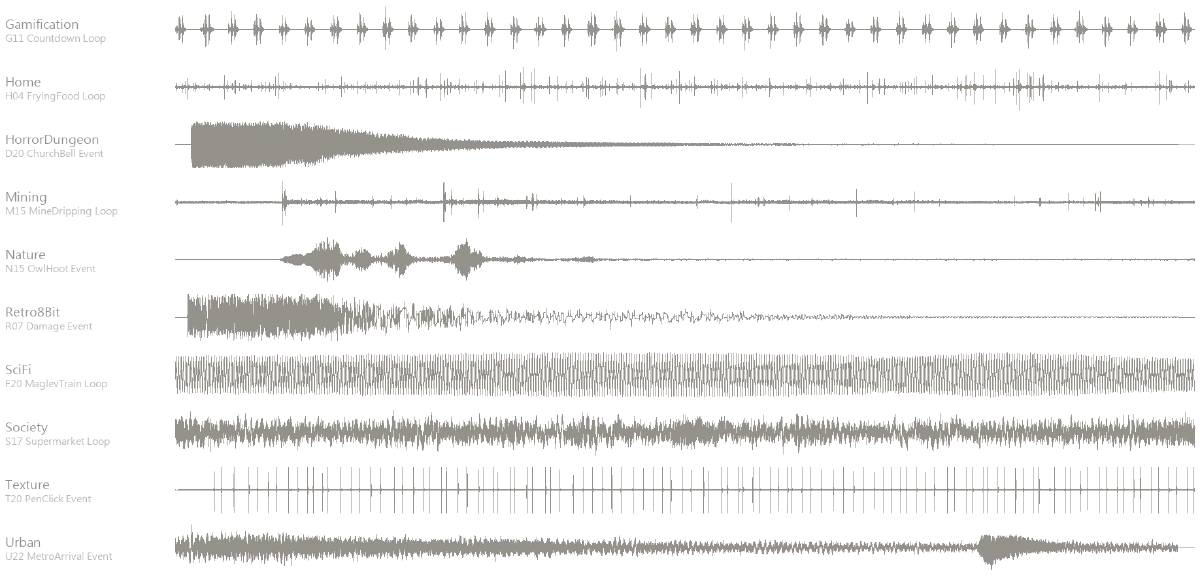
Compare row three (HorrorDungeon, a church bell) with row eight (Society, a supermarket). The bell is one strike decaying over a long tail. The supermarket is an unbroken wash with no beginning and no end. Those two are used completely differently in code, which is why the split has to exist before generation starts. It’s the most important division in the whole library.
| Loop | Event | |
|---|---|---|
| Use | Bed layer, plays continuously | Triggered, plays once |
| Waveform | Even amplitude, no clear start or end | Clear attack, decaying tail |
| Hard part | The seam has to be inaudible | The attack has to be crisp |
| Count | 174 | 146 |
Scale#
| Category | Count | Contents |
|---|---|---|
| Nature | 40 | Rain, thunder, wind, water, wildlife |
| Texture | 40 | Friction, taps, writing, page turns |
| Home | 30 | Kitchen, appliances, domestic life |
| Urban | 30 | Streets, traffic, metro |
| Society | 30 | Crowds, markets, offices |
| SciFi | 30 | Engines, interfaces, energy |
| HorrorDungeon | 30 | Dungeons, footsteps, bells, wind |
| Mining | 30 | Digging, rockfall, drips |
| Gamification | 30 | Scoring, level-up, countdown |
| Retro8Bit | 30 | Chip tones, jumps, damage |
| Total | 320 | 44.1kHz · stereo · 16-bit |
Some of the method#
1. Seamless looping is its own separate stage. The model doesn’t know you intend to loop the output, so the 47 seconds it hands you don’t join up — splice them and you hear a click. Making it genuinely loopable means finding a point near the end whose phase matches the start, cross-fading, then verifying the seam. That stage has its own scripts, entirely separate from generation.
2. Normalise loudness, and don’t do it by peak. If 320 files each sit at a different level, the user re-adjusts volume every time they switch sounds. The right target isn’t “peaks at 0 dB” — that would blow up a quiet rain bed. It’s perceived loudness (LUFS): measure integrated loudness with pyloudnorm, then apply a single gain to hit the target. Peak is used only as a ceiling, to prevent clipping.
3. Somebody has to listen after the batch. This is the one step that can’t be automated away, but it can be made much faster. I wrote a browser review interface — arrow keys to move, up/down to rate, space to play. A run of 30 files takes about eight minutes. Flag the bad ones; the re-run script only regenerates what was flagged.
4. The filename is the index. Every file looks like this: Nature_N01_LightRain_Loop.wav — category, number, content, type. No database needed; ls and grep answer the query. At 30 files this looks like ceremony. At 320 it’s the reason you can still find anything.
What’s not here#
- How the loop point is located, how long the cross-fade runs, and how seam quality is judged automatically
- The loudness target, and why ambiences and event sounds can’t share one
- Per-category prompt strategy — “urban” and “sci-fi” need very different levels of descriptive precision
- The actual yield, and which category needs re-running most often (it isn’t horror)
This shelf was built for AuditoryCompanion. To see the same kind of line applied to images, try the art library.